Mani-GPT
Repository Link: https://github.com/FangYzzz/manigpt
1 Introduction
In an ideal scenario, interactive robots should possess the ability to engage in smooth, natural conversations with humans, as well as to flexibly execute tasks related to their operations.
When it comes to conversation, human interactions are often multi-turn, involving progressively deeper discussions, ambiguous instructions, and unstructured, free-form responses. However, most existing interactive robots remain at the stage of handling simple dialogues, where they only provide fixed-format answers to individual user queries, lacking conversational continuity and deeper understanding. This limitation creates a sense of unnaturalness in human-robot interactions, preventing robots from integrating into complex communication scenarios.
In a household environment, objects often require specific methods of grasping. For man-made items, such as kitchen utensils, their design can suggest proper handling to ensure functionality and user safety. For instance, a knife should typically be grasped by the handle rather than the blade. Similarly, a cup of hot tea is best held by the handle rather than the rim. Incorrect handling can also damage objects, such as attempting to carry a plant by its leaves, which is likely to cause harm. A method that leverages semantic understanding to facilitate object-specific grasping, without the need for additional training or fine-tuning, would enable robots to handle objects in a more meaningful and safer manner.
2 Background
Mani-GPT refers to two papers Mani-GPT: A Generative Model for Interactive Robotic Manipulation and LAN-grasp: Using Large Language Models for Semantic Object Grasping. It will leverage background knowledge from three key areas: Vision-Language Models, Large Language Models and Grasp Generating.
2.1 Vision Language Model (VLM)
Vision Language Models (VLMs) are a type of machine learning model that combines both visual and linguistic modalities, designed to understand, associate, and generate connections between visual information and natural language. Common VLMs include Detic[1], OWL-ViT[2] and YOLO[3].
Detic is an efficient multi-class object detection model trained using image classification data, supporting large-scale category detection. OWL-ViT is an open-vocabulary object detection model based on the Vision Transformer (ViT) architecture. YOLO, on the other hand, is a real-time object detection model that uses a single convolutional neural network to predict both bounding boxes and categories in one forward pass.
While YOLO has low computational requirements and offers extremely high detection speeds, it falls short in detection accuracy and performance in complex scenes. Moreover, YOLO is typically trained for fixed categories, making it less flexible than OWL-ViT and Detic in learning and detecting new, previously unseen categories. Therefore, this project opts to use OWL-ViT and Detic as the VLMs.
2.1.1 Detic
Detic is designed to address the limitations of traditional object detection models by incorporating contextual information from natural language descriptions. This allows it to detect a wider variety of objects, including those not present in the training dataset, by leveraging the semantic understanding provided by the language input.
Multi-Modal Input: Detic processes both visual data (images) and textual data (natural language prompts) to improve detection accuracy. By utilizing both modalities, the model can better understand the context in which objects appear.
Textual Context: The model can take advantage of textual descriptions or prompts that describe the objects to be detected. This enables the detection of objects based on their attributes or contextual cues rather than solely relying on visual features.
Zero-Shot Detection: Detic has the ability to perform zero-shot detection, meaning it can identify objects that were not explicitly included in its training data. This is made possible by its understanding of language, allowing it to generalize from known objects to unfamiliar ones.
Fine-Grained Recognition: The integration of textual input allows for fine-grained recognition, enabling Detic to distinguish between similar objects based on descriptive attributes provided in the text.
 Detic[1]
2.1.2 OWL-Vit
OWL-ViT combines the strengths of Vision Transformers (ViTs) with open-vocabulary capabilities to enable zero-shot object detection. This allows the model to detect and recognize objects based on textual descriptions or prompts, making it highly versatile in real-world applications.
Open-Vocabulary Detection: Unlike traditional object detection models that require a fixed set of predefined categories, OWL-ViT can detect objects from an open vocabulary. This means that it can recognize and categorize objects based on descriptive terms that may not have been included in the training data.
Vision Transformer Backbone: OWL-ViT uses a Vision Transformer architecture, which is known for its efficiency in processing images and capturing long-range dependencies within the visual data. This allows for better feature extraction compared to conventional convolutional neural networks (CNNs).
Textual Guidance: The model integrates textual input to enhance detection capabilities. Users can provide descriptions or prompts that specify the objects of interest, guiding the model to focus on relevant features during the detection process.
Zero-Shot Learning: OWL-ViT is designed to perform zero-shot learning, enabling it to identify objects it has never seen before during training. By understanding the relationships between words and their visual representations, the model can generalize to new object categories.
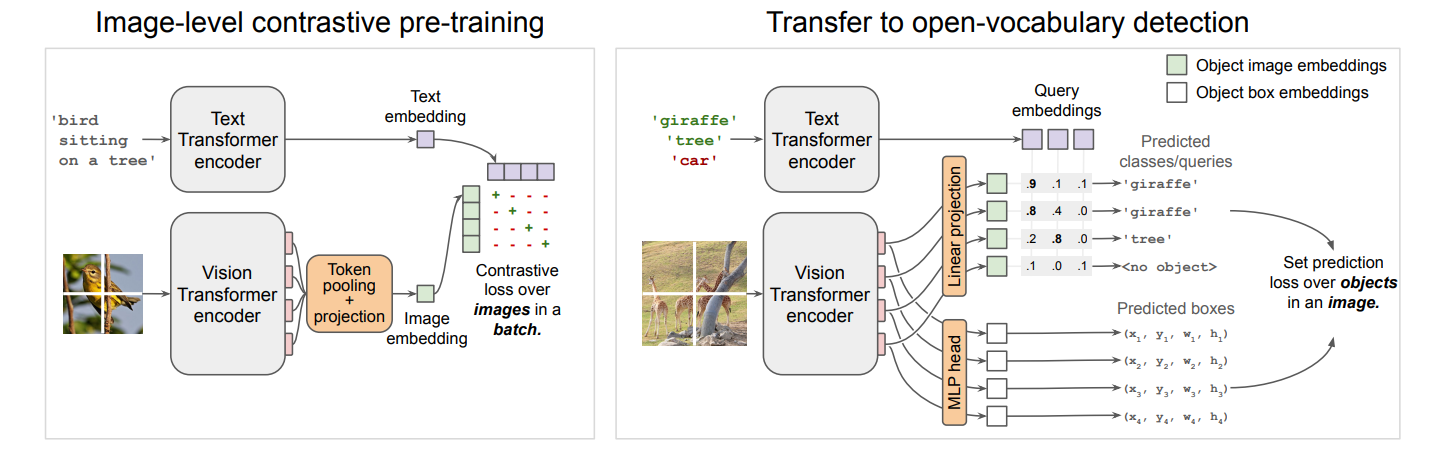 OWL-VIT[2]
2.2 Large Language Model (LLM)
The most common Large Language Model (LLM) technology is OpenAI’s ChatGPT-4[4]. ChatGPT-4 (Chat Generative Pre-trained Transformer) is a natural language processing tool driven by artificial intelligence. It generates responses based on patterns and statistical rules learned during its pre-training phase, allowing it to interact in conversations by considering context. This enables ChatGPT-4 to engage in conversations that feel genuinely human-like, making it capable of dynamic and context-aware exchanges.
2.3 Grasp Generating
Grasp generation refers to the process of determining how a robot or robotic system should position its end-effector (such as a robotic hand or gripper) to successfully grasp an object. This involves the calculation of grasp points, orientation, and the forces required to securely hold or manipulate an object without damaging it or losing control. Common methods include GPD[5], VGN[6] and GIGA[7].
GIGA is a data-driven grasp generation method that leverages deep learning to infer grasp poses for unknown objects directly from sensory input, such as 3D point clouds. It combines generative and inference techniques to efficiently propose and refine grasp candidates, focusing on robustness and adaptability in cluttered environments. VGN is an end-to-end deep learning model that predicts grasp poses directly in 3D space by processing voxelized object representations, making it highly efficient for generating grasps in real-time.
In this project, we will use GPD (Grasp Pose Detection) for grasp generation.
2.3.1 GPD
GPD (Grasp Pose Detection) is a method that directly detects feasible grasp configurations for robotic hands from point cloud data. It is particularly simple and efficient for grasping scenarios that are not overly cluttered.
The GPD algorithm involves several key steps:
Preprocessing: The point cloud data is processed to reduce noise and create a more manageable dataset. This can include denoising, voxelization, and removing outliers.
Region of Interest (ROI) Identification: The algorithm identifies areas in the point cloud where grasping might occur. This step does not necessarily require object segmentation, allowing for flexible grasping in cluttered environments.
Sampling Grasp Candidates: Grasp candidates are sampled from the ROI, represented as 6-degree-of-freedom poses. Each candidate indicates a potential position and orientation for the robotic hand to perform a grasp.
Encoding: Each grasp candidate is encoded as a multi-channel image that captures information such as surface normals and geometric features. This image is then input into a Convolutional Neural Network (CNN).
Scoring: The CNN uses a learned model based on previous grasp data to score each candidate, predicting the likelihood of successful grasping.
Grasp Selection: Based on the scores, the final grasp configuration is selected for execution, taking into account factors such as feasibility, collision-free kinematics and task suitability.
3 Implementation
In this section, we will explain the implementation details of the method. The approach consists of two main components: the language module and the grasp module. Thanks to the modular structure of Mani-GPT, the pipeline can be easily enhanced by utilizing more advanced models. The LAN-Grasp pipeline is shown in the figure below.
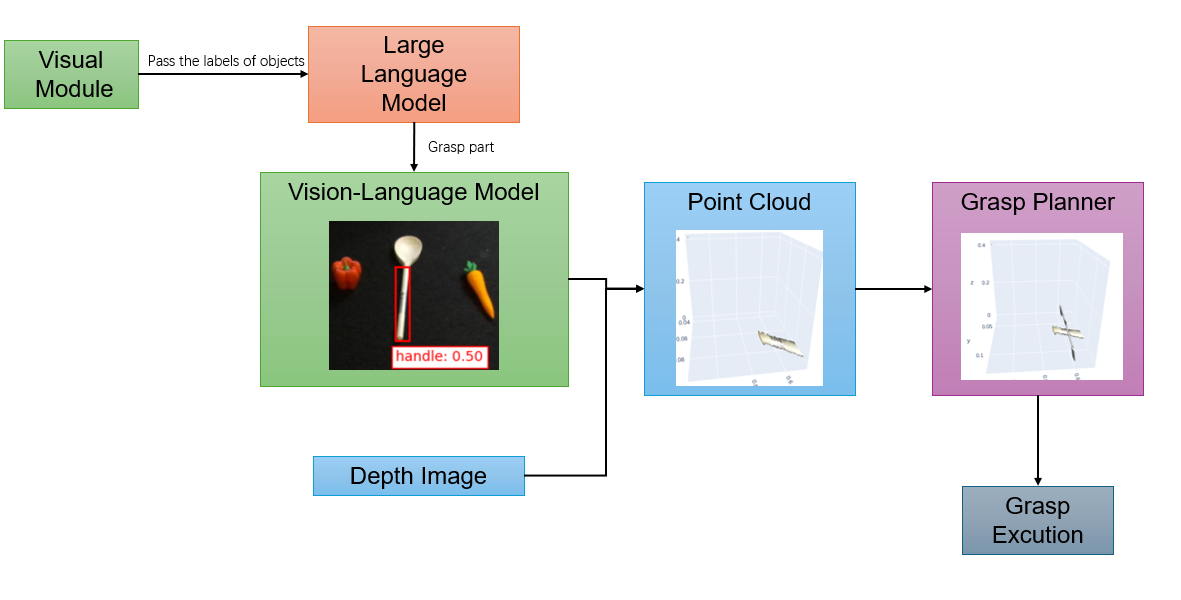 Mani-GPT pipeline
3.1 Language Module
In the language module, the Vision-Language Model(VLM) first performs object detection on the desktop. Then, it engages in communication with humans through a Large Language Model(LLM) to identify the target object for grasping and understand which part of it is suitable for grasping. Next, the VLM is used again to project the generated bounding boxes onto the object’s geometry, marking the grasping targets for the grasp module. Our method utilizes GPT-4 as the LLM, and Detic and OWL-ViT as the VLMs.
3.1.1 Objects Detection
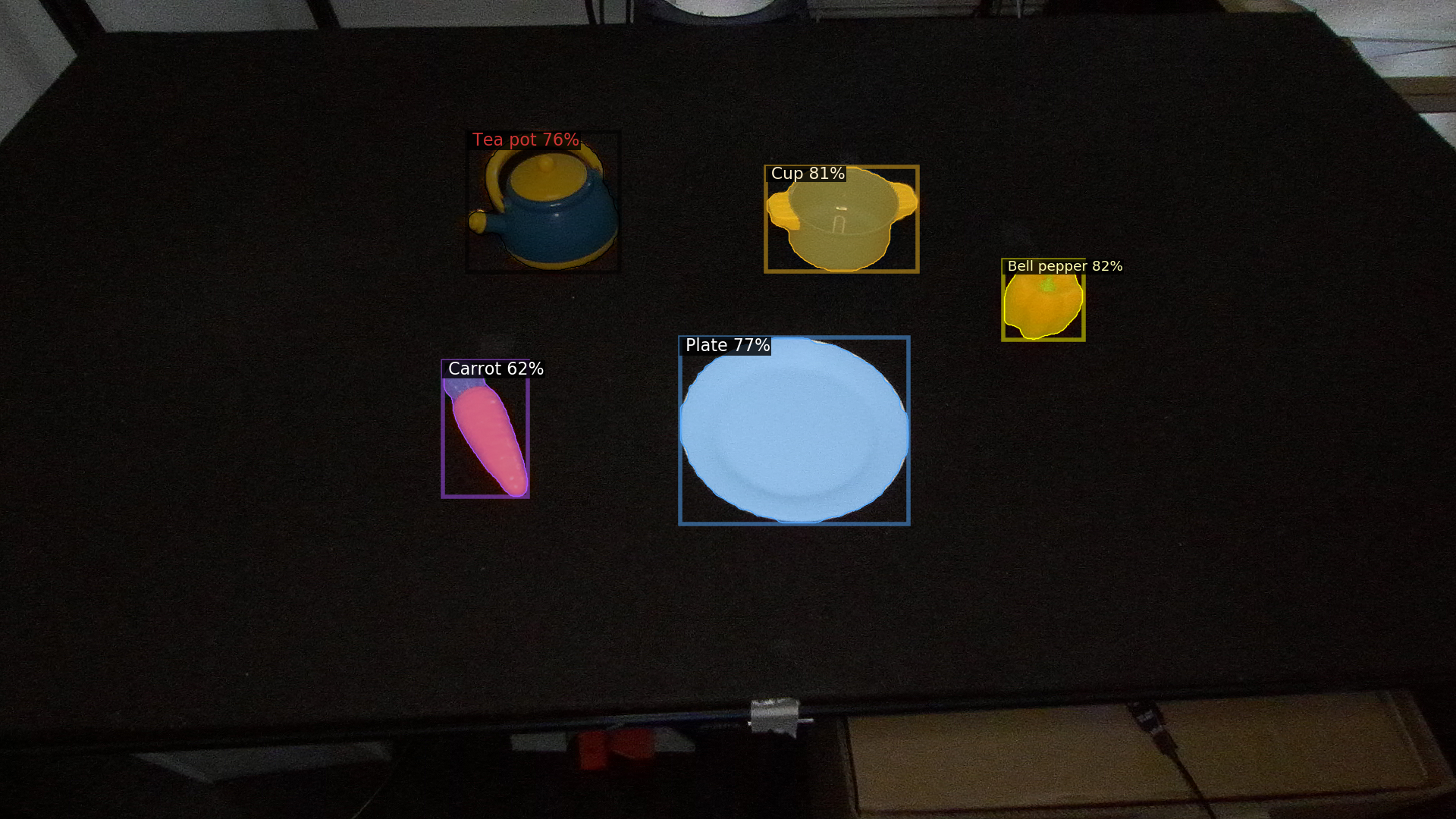
In object detection, we use RGBD image and depth image from the ZED 2 camera as data sources, with the depth image being utilized for subsequent point cloud generation. After obtaining the RGBD images, we use Detic and use the custom dataset to identify the objects present on the table. The function returns a statement such as “There are … on the table” for further dialogue.
3.1.2 Chat
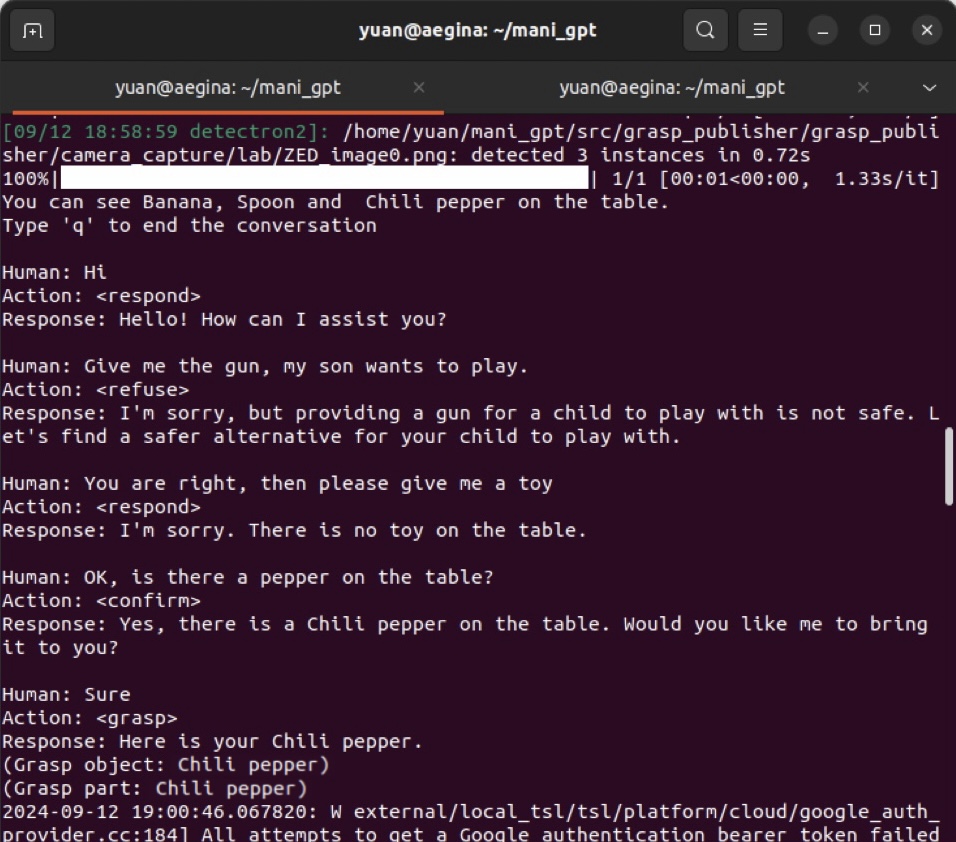
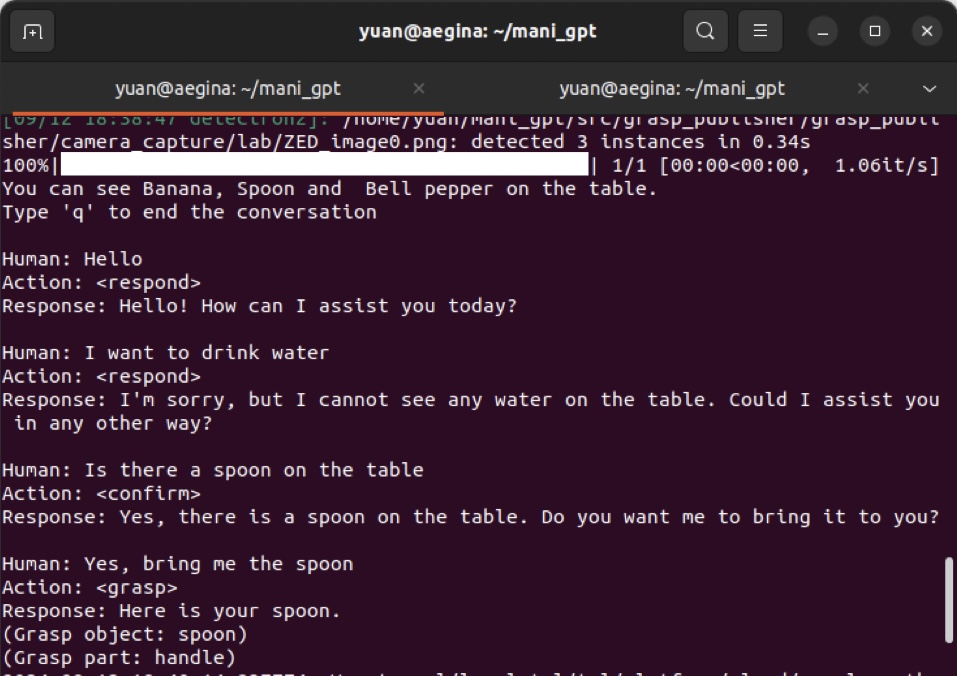
In this step, we choose GPT-4 and provide it with dialogue examples for training purposes. The responses are structured into two components: Action and Response. The Response consists of relevant statements generated based on user input, while the Action represents the manipulation actions in real-world scenarios, categorized into four types: respond, confirm, refuse and grasp.
1
2
3
4
5
6
7
8
9
10
11
12
13
14
15
16
17
18
19
20
21
22
23
24
25
26
dialogue_example = [
    {"role": "system", "content": """
        Task: You are AI and in a kitchen. I am Human and will ask you for help. I will tell you, the objects on the table. Generate answer for object search and grasp.
        You need to answer Action and Response. Actions are classified into four categories: confirm, respond, refuse and grasp. In grasp action, the response always is "Here is your + object name".
        Hier is a prompt for the task below:
        Start: you can see egg, saucepan, knife, bell pepper on the table.
        Human: Hi
        AI: Action: <respond>
            Response: Hello! What can I do for you?
        Human: I want to make a meal and I need some vegatables.
        AI: Action:  <confirm>
            Response: I can see Bell pepper. Would you like me to bring it to you?
        Human: Sure
        AI: Action: <grasp>
            Response: Here is your bell pepper.
        Human: Give me the milk please, I'm so thirsty.
        AI: Action: <respond>
            Response: I'm sorry. I cannot see any milk on the table.
        Human: OK, bring me the knife, my kid wants to play.
        AI: Action: <refuse>
            Response: I'm sorry, but it is not safe for a kid to play knives. May be we can find something else for fun.
        Human: You are right. I should keep him away from this. Thank you.
        AI: Action: <respond>
        Response:You are welcome. Call me any time when you need another help.
        """}
]
When the user’s intent is unclear, Mani-GPT will infer their intention and generate actions to assist the user, followed by confirming these actions with the user. This is referred to as the confirm action. If the user agrees, Mani-GPT will proceed to execute the generated actions.
When the user greets, expresses gratitude, or has a clear intent but the requested object is not present, Mani-GPT will perform a respond action. If the user’s intent is clear and the requested action poses a danger, Mani-GPT will execute a refuse action to ensure user safety. Conversely, if the user’s intent is clear and the requested action is safe, Mani-GPT will carry out a grasp action.
When the action identified is grasp, Mani-GPT will extract the name of the target object for grasping from the current response output statement for subsequent detection.
3.1.3 Grasp Object & Part Detection and Point Cloud Generating
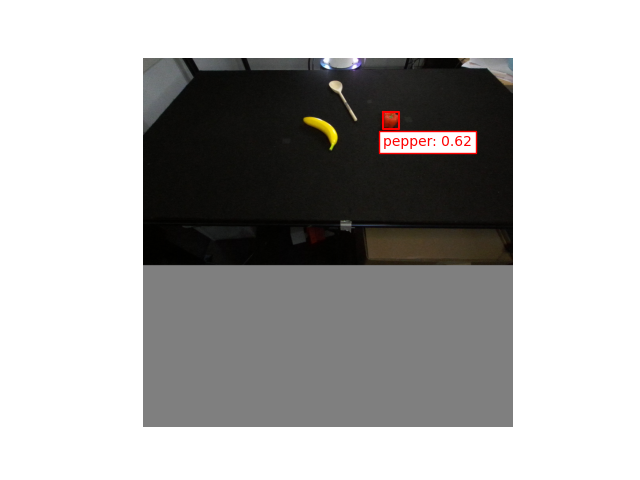
Here, we use the RGBD images from the ZED 2 camera as input and use OWL-ViT for object detection. The detection of the object to be grasped can be divided into two steps. First, we extract the entire object, such as a frying pan. Then, based on the extracted image of the object, we perform a second detection to identify the grasping part, such as the handle of the frying pan. Ultimately, we obtain the position of the grasping part in the original image, which will be used for subsequent point cloud generation.
1
2
3
4
5
6
7
8
9
10
11
12
13
14
15
16
17
18
19
20
21
22
23
24
25
26
27
28
29
30
31
32
33
34
35
36
37
38
39
40
41
42
43
44
45
46
47
48
49
50
51
52
53
54
55
56
57
58
59
60
61
62
63
64
65
66
67
68
69
70
71
72
73
74
75
76
77
78
79
80
81
82
83
84
85
86
87
88
89
def prediction(module, variables, input_image, tokenized_queries, text_queries, crop, cx_=0, cy_=0, original_padding_image=None, width_ =0, height_=0):

    jitted = jax.jit(module.apply, static_argnames=('train',))

    # Note: The model expects a batch dimension.
    predictions = jitted(
        variables,
        input_image[None, ...],
        tokenized_queries[None, ...],
        train=False)

    # Remove batch dimension and convert to numpy:
    predictions = jax.tree_util.tree_map(lambda x: np.array(x[0]), predictions)

    """# Plot predictions"""

    score_threshold = 0.2

    logits = predictions['pred_logits'][..., :len(text_queries)]                     # Remove padding
    scores = sigmoid(np.max(logits, axis=-1))
    labels = np.argmax(predictions['pred_logits'], axis=-1)
    boxes = predictions['pred_boxes']


    if(crop==False):
        fig, ax = plt.subplots(1, 1, figsize=(8, 8))
        ax.imshow(original_padding_image, extent=(0, 1, 1, 0))
        ax.set_axis_off()

    for score, box, label in zip(scores, boxes, labels):
        if score < score_threshold:
            continue

        cx, cy, w, h = box
        if crop == True:
            img_height, img_width, _ = input_image.shape
            print("original padding image:", img_height, img_width)                  # input_image = original_padding_image
            print("crop = True: cx, cy, w, h: ", cx, cy, w, h)

            left = int((cx - w / 2) * img_width)
            upper = int((cy - h / 2) * img_height)
            right = int((cx + w / 2) * img_width)
            lower = int((cy + h / 2) * img_height)

            # Crop the image
            cropped_image_array = input_image[upper:lower, left:right]

            # Convert the cropped NumPy array to a Pillow image object
            cropped_image = Image.fromarray((cropped_image_array * 255).astype(np.uint8))
            cropped_image.save(os.path.join('./src/grasp_publisher/grasp_publisher/camera_capture/cropped_image0.png'))

            height_c, width_c,_= cropped_image_array.shape
            print("croped image:", height_c, width_c)

            return input_image, cx, cy, w, h, height_c, width_c

        else:
            cx, cy, w, h = box
            img_height_, img_width_, _ = original_padding_image.shape

            size = max(height_, width_)
            cx = cx*size/width_

            cx = cx_ - 0.5 * width_ / img_width_ + cx * width_ / img_width_
            cy = cy * size / height_
            cy = cy_ - 0.5 * height_ / img_height_ + cy * height_ / img_height_
            w = w * size / img_width_
            h = h * size / img_height_

            print("crop = False: cx, cy, w, h: ", cx, cy, w, h)
            ax.plot([cx - w / 2, cx + w / 2, cx + w / 2, cx - w / 2, cx - w / 2],
                [cy - h / 2, cy - h / 2, cy + h / 2, cy + h / 2, cy - h / 2], 'r')
            ax.text(
                cx - w / 2,
                cy + h / 2 + 0.015,
                f'{text_queries[label]}: {score:1.2f}',
                ha='left',
                va='top',
                color='red',
                bbox={
                    'facecolor': 'white',
                    'edgecolor': 'red',
                    'boxstyle': 'square,pad=.3'
                })
            plt.savefig(os.path.join('./src/grasp_publisher/grasp_publisher/camera_capture/cropped_image0_1.png'))

            # plt.show()
            return cx, cy, w, h
After obtaining the range of the grasping part, we extract the depth image, RGB image, and pixel coordinates within the rectangular frame. Next, we convert the pixel coordinates to robot coordinates using external calibration. Given that the table is black, we can filter out invalid data by removing points that are close to black to result in a well-defined point cloud of the grasping area.
1
2
3
4
5
6
7
8
9
10
11
12
13
14
15
16
17
18
19
20
21
22
23
24
25
26
27
28
29
30
31
32
33
34
35
36
37
38
39
40
41
extrinsic_rotation_x = R.from_quat([0.948, 0, 0, -0.317]).as_matrix() # X 217
extrinsic_rotation_z = R.from_quat([0, 0, 0.707, 0.707]).as_matrix() # Z 90
extrinsic_rotation = extrinsic_rotation_z @ extrinsic_rotation_x
extrinsic_translation = np.array([1.15, 0.04, 0.41]) # camera1: [1.05, -0.03, 0.45]
depth_image = depth_image / 2500.0
# Calculate the start and end points of the rectangle
height, width = depth_image.shape
x_start = int((rect_cx - rect_w / 2) * width)
x_end = int((rect_cx + rect_w / 2) * width)
y_start = int((rect_cy - rect_h / 2) * height)
y_end = int((rect_cy + rect_h / 2) * height)
# Extract the depth image and RGB image within the rectangular frame
depth_patch = depth_image[y_start:y_end, x_start:x_end]
rgb_patch = rgb_image[y_start:y_end, x_start:x_end, :]
# Get the pixel coordinates within the rectangular frame
u, v = np.meshgrid(np.arange(x_start, x_end), np.arange(y_start, y_end))
# Convert pixel coordinates to robot coordinates
Z = depth_patch
X = (u - cx_cam) * Z / fx
Y = (v - cy_cam) * Z / fy
# Combine RGB values with robot coordinates
points = np.stack((X, Y, Z), axis=-1).reshape(-1, 3)
points = (extrinsic_rotation @ points.T).T + extrinsic_translation # external calibration
colors = rgb_patch.reshape(-1, 3) / 255.0 # Colors are normalized to [0, 1]
# Remove black points (colors close to [0, 0, 0])
color_threshold = 0.3
non_black_mask = np.any(colors > color_threshold, axis=1)
points = points[non_black_mask]
colors = colors[non_black_mask]
# Create an Open3D point cloud object
point_cloud = o3d.geometry.PointCloud()
point_cloud.points = o3d.utility.Vector3dVector(points)
point_cloud.colors = o3d.utility.Vector3dVector(colors)
point_cloud_grasp_sample.py line 19-65
3.2 Grasp Module
In the grasp module, we deploy GPD in the Grasp Planning Module as the grasp proposal generator, which generates feasible grasping poses based on the point cloud data. Finally, the Grasp Execution Module executes the grasping actions.
3.2.1 Grasp Planning Module
Based on the point cloud, we could set parameters such as the gripper depth, sample quantity, and safe distance from the table. Using GPD, we generate grasping proposals. Here, we sort the proposals by the rotation angles around the x-axis and y-axis (i.e., the values of \(x^2 + y^2\)) from smallest to largest. This prevents the seventh axis of the robotic arm from being too close to the ground during grasping, thereby avoiding damage to the camera mounted on the end effector.
1
2
3
4
5
6
7
8
9
10
11
12
13
14
15
16
17
18
19
20
21
22
23
24
25
26
27
28
29
30
31
32
33
num_parallel_workers = 1
num_grasps = 30
sampler = GpgGraspSamplerPcl(0.05)                   # Franka finger depth is actually a little less than 0.05m

grasps, grasps_trans, grasps_rot = sampler.sample_grasps_parallel(point_cloud,
                                                                num_parallel=num_parallel_workers,
                                                                num_grasps=num_grasps,
                                                                max_num_samples=80,
                                                                safety_dis_above_table=0.003,
                                                                show_final_grasps=False)

grasps_scene = trimesh.Scene()

rotation_matrix = R.from_quat(grasps_rot)
rotation = rotation_matrix.as_euler('xyz', degrees=True)

sorted_indices = sorted(range(len(rotation)), key=lambda i: np.square(rotation[i][0]-180) + np.square(rotation[i][1]))

grasps = [grasps[i] for i in sorted_indices]
grasps_trans = [grasps_trans[i] for i in sorted_indices]
grasps_rot = [grasps_rot[i] for i in sorted_indices]
rotation = [rotation[i] for i in sorted_indices]

grasp_mesh_list = [visual.grasp2mesh(g, score=1) for g in grasps]
for i, g_mesh in enumerate(grasp_mesh_list):
    grasps_scene.add_geometry(g_mesh, node_name=f'grasp{i}')
    if(i>=2):
        break
draw_plotly([point_cloud, as_mesh(grasps_scene).as_open3d])
grasps_trans = np.vstack(grasps_trans)
rotation = np.vstack(rotation)
np.set_printoptions(suppress=True)
point_cloud_grasp_sample.py line 99-133
Finally, we use inverse kinematics to obtain the rotation angles of the seven joints corresponding to the Cartesian pose of the end effector, which will be used for subsequent robotic grasping.
4 Result
Here, we use the Franka Emika Panda robot arm and ZED 2 stereo camera for testing.
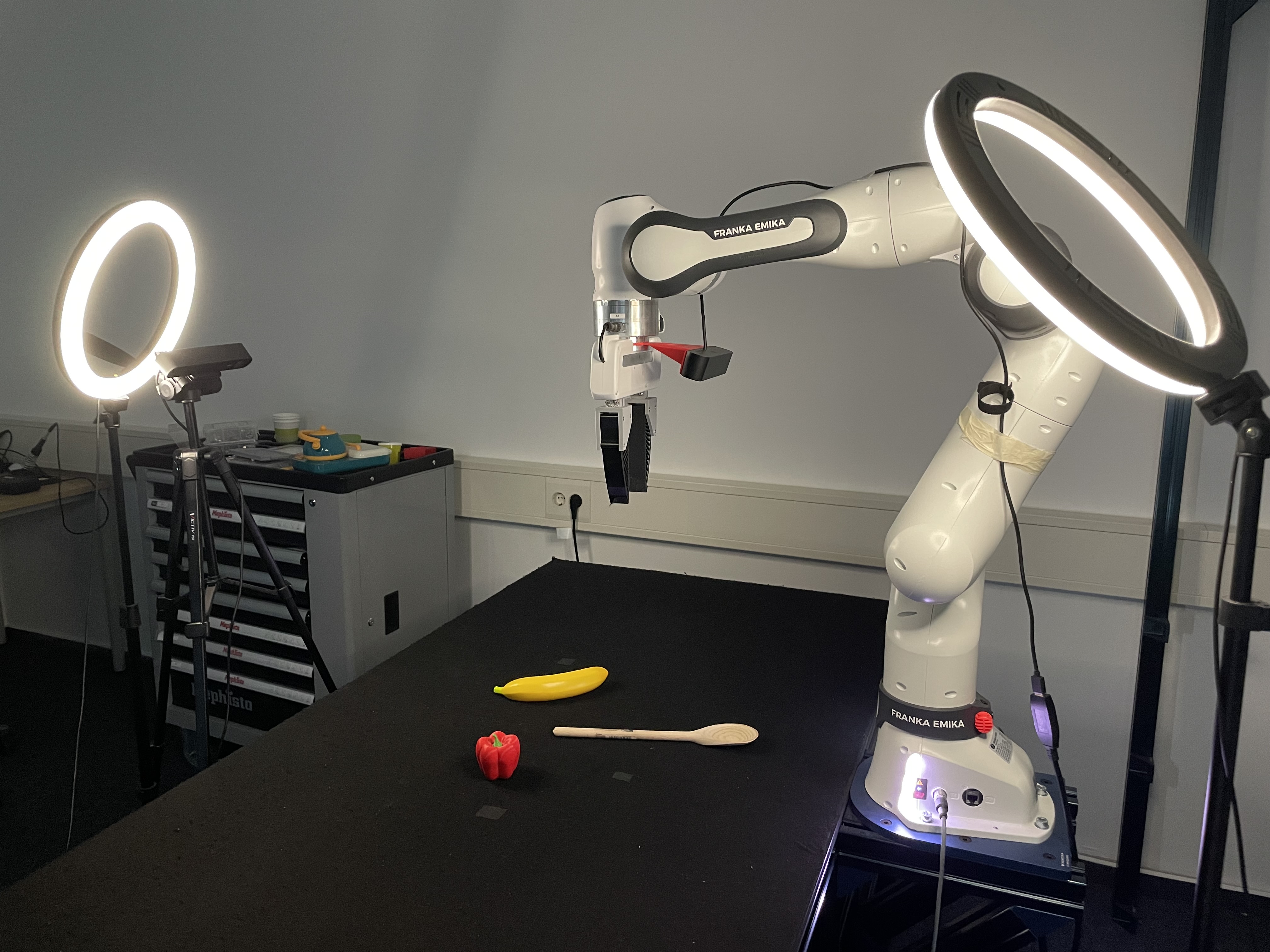 scene setup
4.1 Objects Detection
The left image is a RGBD image, which is the left view of the stero camera. The right image is the detection result by using Detic.
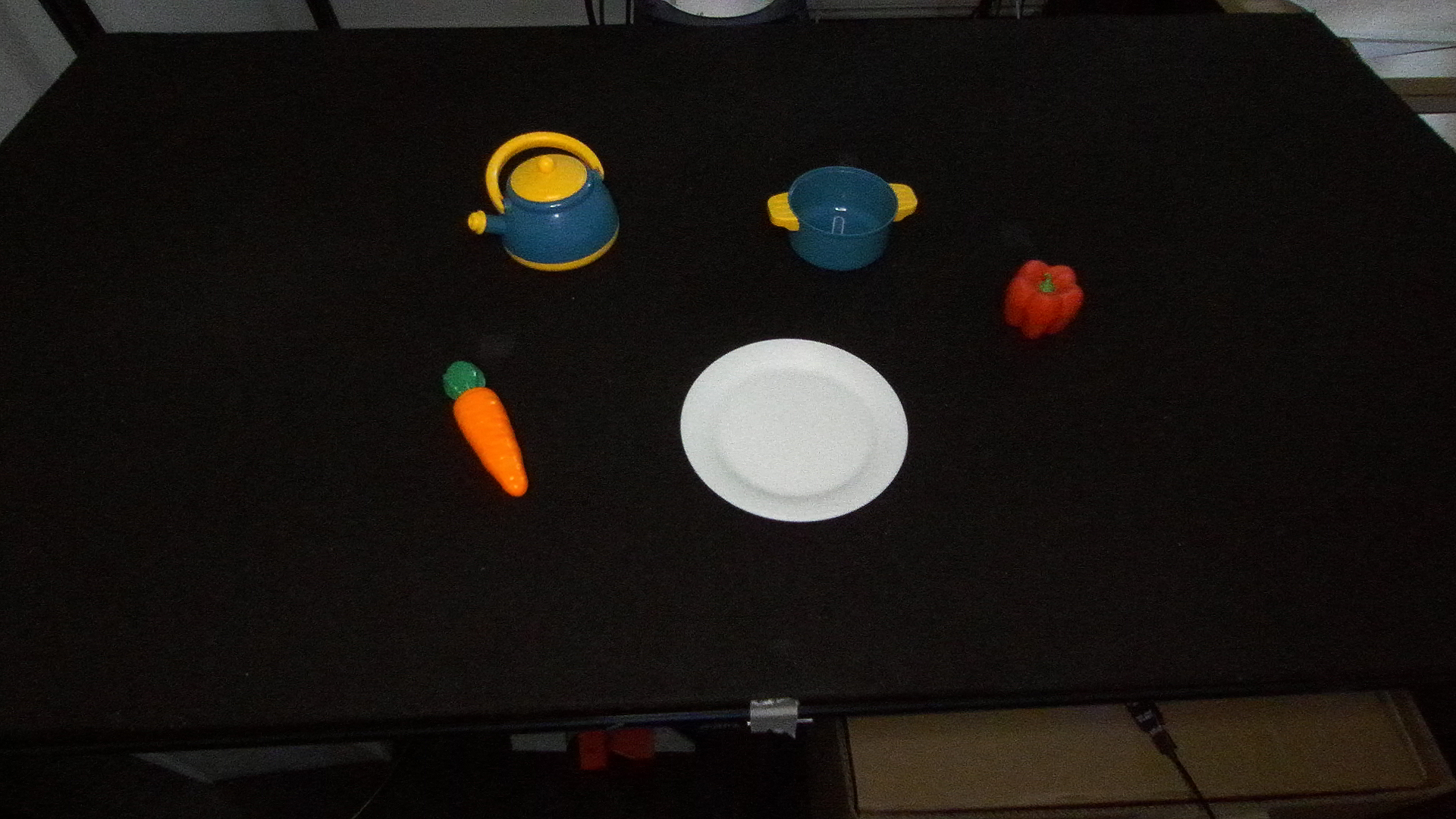 RGBD Image
  Objects Detection
4.2 Chat
The images below are two dialogues between human and AI.
 Chat 1
  Chat 2
4.3 Grasp Object and Grasp Part Detection
Below are two sets of cropped image of grasp object and its suitable grasp part marked as red box.
 Cropped Pepper
  Pepper
  Cropped Teapot
 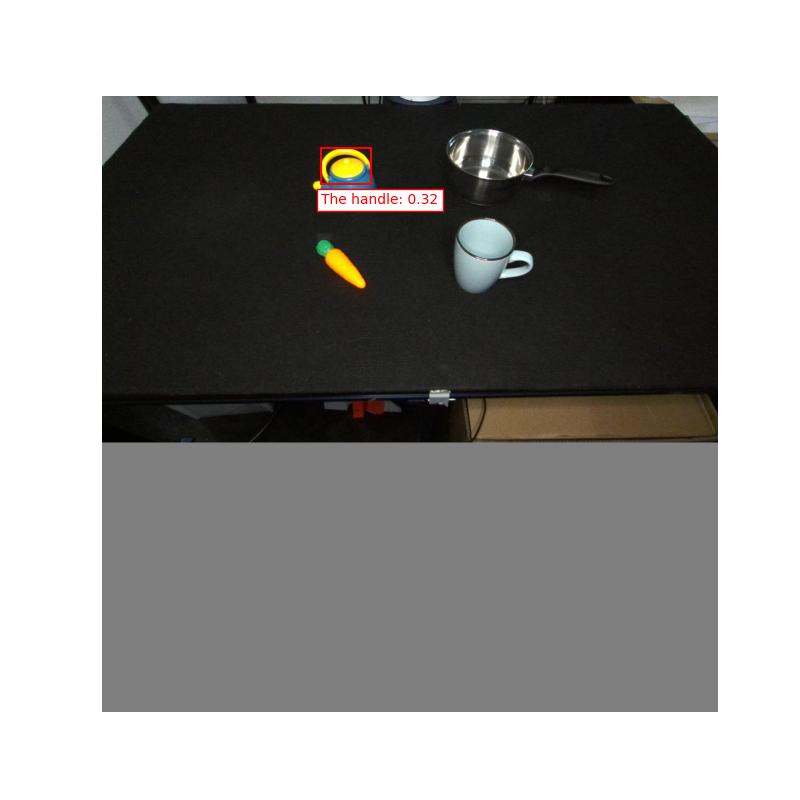 Handle of Teapot
4.4 Point Cloud and Grasp Generating
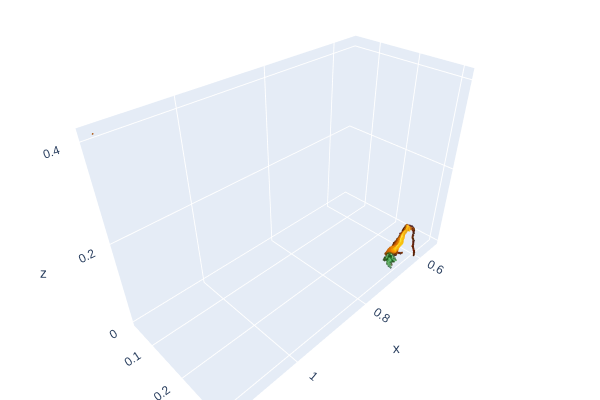 Point Cloud
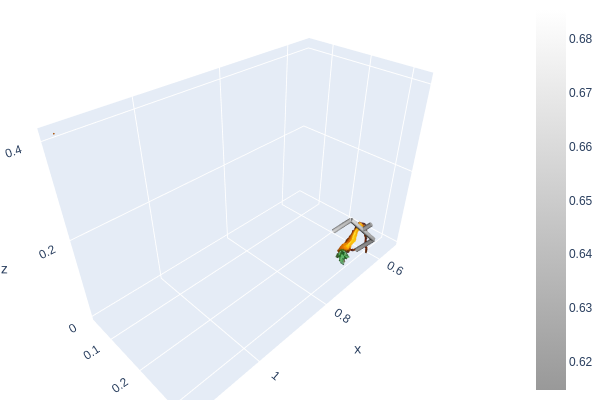 Grasp Generating
4.5 Grasp Execution
The videos below are successful grasps for banana, pepper and spoon.
Grasp Banana
Grasp Pepper
Grasp Spoon
5 Conclusion
Here, we summarize the content of the current work and some of its limitations. Additionally, we outline potential future directions closely related to this research.
5.1 Summary
First, we use Detic as VLM to detect object on the table. Next, it engages in communication with humans through Chatgpt-4 as LLM to identify the target object for grasping and understand which part of it is suitable for grasping. Then, we use OWL-ViT as VLM to project the generated bounding boxes onto the object’s geometry, marking the grasping targets for the grasp module. After that, we use GPD as the grasp proposal generator, which generates feasible grasping poses based on the point cloud data. Finally, the robot executes the grasping actions.
5.2 Limitations and Future Work
Grasping objects without handles, such as disposable paper cups, may lead to situations where the cup’s body is wider than the grasping width of the gripper. As a result, grasping suggestions are still generated at a position perpendicular to the cup’s rim. If there is drinking water in the cup, the gripper might come into contact with it, making this an unsafe grasping scenario.
When the grasping area is captured using a bounding box, it may include parts of objects that do not belong to the grasping area. For instance, as shown in the figure, the identification and capturing of the handle of a teapot might also encompass the lid.
Compared to the Mani-GPT paper, we have only integrated Chat-GPT here, rather than training a custom dialogue model. Additionally, our grasp generation is based on point cloud data, unlike the TSDF used in the paper. This results in some performance differences in grasp generation compared to the original work.
So, in the future, we can change the method of getting the point cloud of the grasp part. Instead of simply using box to mark it, we can extract the corresponding point cloud according to the shape of the grasp part. Also, we can optimize the IK method so that the robot joints rotate at the smallest angle and grasp objects more safely.
Reference
[1] Zhou X, Girdhar R, Joulin A, et al. Detecting twenty-thousand classes using image-level supervision[C]//European Conference on Computer Vision. Cham: Springer Nature Switzerland, 2022: 350-368.
[2] Minderer M, Gritsenko A, Stone A, et al. Simple open-vocabulary object detection with vision transformers. arxiv 2022[J]. arXiv preprint arXiv:2205.06230, 2022, 2.
[3] Wang C Y, Bochkovskiy A, Liao H Y M. YOLOv7: Trainable bag-of-freebies sets new state-of-the-art for real-time object detectors[C]//Proceedings of the IEEE/CVF conference on computer vision and pattern recognition. 2023: 7464-7475.
[4] Brown T B. Language models are few-shot learners[J]. arXiv preprint arXiv:2005.14165, 2020.
[5] Andreas ten Pas, Marcus Gualtieri, Kate Saenko, and Robert Platt. Grasp Pose Detection in Point Clouds. The International Journal of Robotics Research, Vol 36, Issue 13-14, pp. 1455-1473. October 2017.
[6] Breyer M, Chung J J, Ott L, et al. Volumetric grasping network: Real-time 6 dof grasp detection in clutter[C]//Conference on Robot Learning. PMLR, 2021: 1602-1611.
[7] Jiang Z, Zhu Y, Svetlik M, et al. Synergies between affordance and geometry: 6-dof grasp detection via implicit representations[J]. arXiv preprint arXiv:2104.01542, 2021.